Screen Grabber Pro – Screen Record Your Activity in High Quality — Streaming Videos, Webinars, Tutorials, Games, & More.
Screen Grabber enables you to easily capture and save any activity happening on your computer screen for both personal and business use.
Video gameplay, web videos, instructions, tutorials, webinars, meetings, video chats, podcasts, music, and more can be recorded in superb quality.
This computer screen recorder comes with an editor that allows you to annotate the recording in real-time to polish it. After the recording has been saved, you can use the advanced video editor to enhance it and make it look more professional.
It’s also packed with more features like record scheduling, mouse effects, hotkeys, and more.

Record Whatever You See on Computer Screen
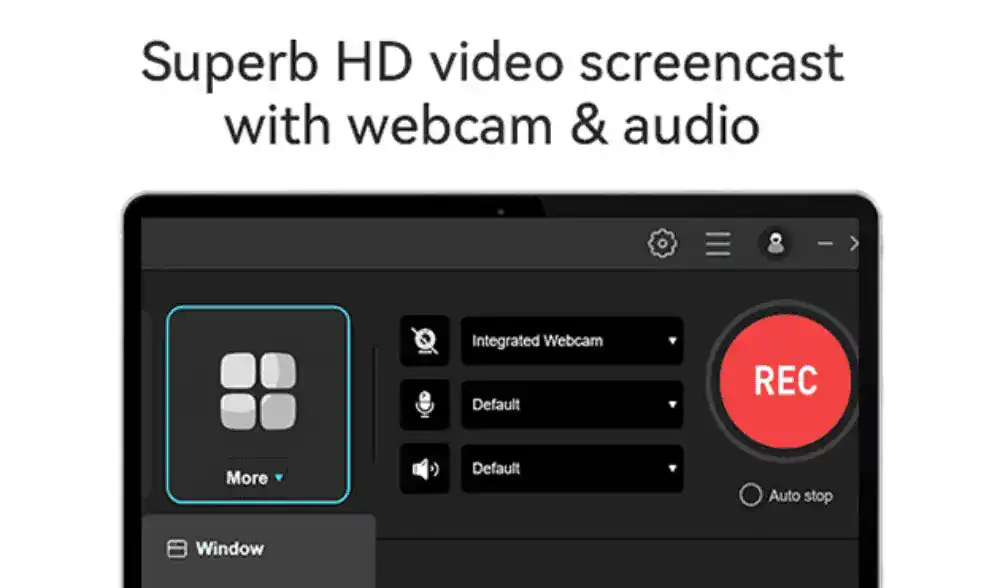
Multiple Recording Modes: Capture the entire screen or a selected region, record only audio, capture video from a webcam, or record specific areas around the mouse.
Different Audio Input: Record screen with audio simultaneously. Select to record the screen with system audio, sound from a microphone, or both.
Various Output Formats: Save the screencast to MP4, WMV, AVI, MOV, FLV, MPEG, VOB, GIF, etc. for smooth playback and sharing.
Take Screenshot: Capture your computer screen with the screenshot function and directly share it with Facebook, Twitter, Google+, or Pinterest
Annotate & Edit Your Recording Instantly
Annotate in Real Time: You can mark up the screencast with text, highlights, arrows, rectangles, ellipses, drawings, etc. during the recording.
Add Webcam Overlay: Add a webcam to record the screen with your face to achieve a video-in-video effect, which is especially useful when recording gameplays.
Edit Captured Screencast: Click Edit to import the recorded video to the professional video editor for further editing like trim, merging, rotating, applying effects, adding watermarks, etc.